

Customers cannot touch a product, meet the seller or inspect a store when they shop online. They decide whether to buy by interpreting signals on the screen. That makes trust one of the most important conversion factors in e-commerce.
The right e-commerce website design elements reduce uncertainty at every stage of the buying journey. They show that the business is legitimate, the product is accurately represented, payment is protected and help will be available if something goes wrong. The following ten elements help businesses create a store that feels credible and easy to use.
Why Customer Trust Matters in E-Commerce Design
A visitor may genuinely want a product and still abandon the purchase if the website feels unfamiliar, confusing or risky. Weak product information, surprise charges, broken layouts and vague return policies all create friction. Each unanswered question gives the customer another reason to delay.
Trust-focused design is not about adding decorative badges everywhere. It is about giving customers clear evidence, predictable interactions and control over their decisions. When your store combines professional presentation with transparent information, customers can move from discovery to checkout with greater confidence.
1. A Professional, Consistent Visual Identity
First impressions form quickly. A consistent logo, color palette, typography system and image style make the store feel intentional rather than temporary. Visual consistency should continue across the homepage, category pages, product pages, cart, checkout and customer emails.
Use adequate spacing, readable type and a clear hierarchy. Avoid mismatched fonts, low-quality graphics and design effects that compete with product information. If your visual identity feels fragmented, customers may question whether the business is equally careless with products and payments. The Visual Spark’s graphic design services can help establish a polished system that works across the full customer journey.
2. Simple Navigation and Effective Product Search
Customers trust stores that help them find what they need without effort. Keep the main navigation focused, organize products into logical categories and use familiar labels. Category structures should reflect how customers think, not only how the inventory is managed internally.
For larger catalogs, provide search with useful filtering and sorting. Filters may include size, price, color, availability, rating or another attribute relevant to the product. Always show customers where they are, allow them to remove filters easily and prevent dead-end result pages wherever possible.
3. Clear, Complete Product Information
Product pages must answer the questions a customer would normally ask in a physical store. Provide accurate titles, benefits, specifications, dimensions, materials, care instructions, compatibility or ingredients where relevant. Use concise sections so customers can scan quickly without losing important details.
Price, stock status, available variations and expected delivery information should be visible before the shopper adds the item to the cart. Do not hide limitations or essential conditions in fine print. Honest information may not persuade every visitor, but it attracts better-fit customers and reduces returns.
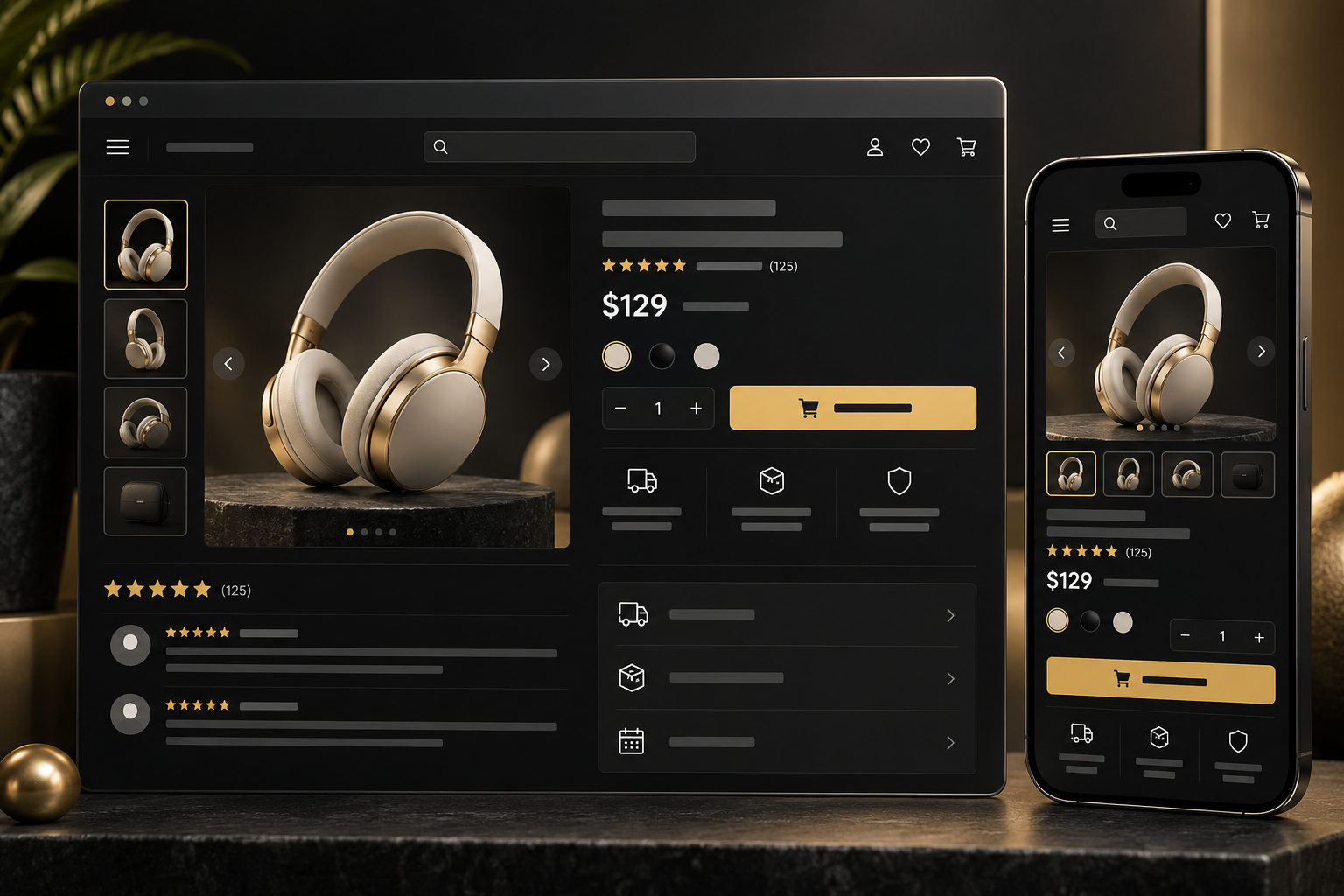
4. High-Quality Product Images and Helpful Media
Product photography is evidence. Use sharp, consistent images from several angles and let customers zoom in on meaningful details. Where useful, include scale references, lifestyle context, short demonstrations or simple video.
Images should represent the real product accurately. Heavy editing, inconsistent colors and generic stock photos can create doubt and lead to disappointment after delivery. Optimize every file for speed, use descriptive alternative text and preserve enough quality for customers to inspect the item.
5. Genuine Reviews and Social Proof
Reviews reduce the risk of being the first person to try an unfamiliar store. Display an overall rating, the number of reviews and recent customer feedback near the relevant product. If possible, allow reviewers to share photos or comment on attributes such as fit, quality or ease of use.
Trust depends on authenticity. Do not remove every critical review or populate the store with vague, repetitive praise. Balanced feedback often appears more credible, especially when the business responds constructively. Testimonials, press mentions and verified purchase labels can support trust when they are truthful and clearly attributed.
6. Visible Security and Trusted Payment Options
The entire website should use HTTPS, not only the checkout page. Customers should recognize the available payment methods and understand that their payment information is handled securely. Keep trust cues close to the action they support—for example, a concise security message beside the payment section.
Avoid exaggerated security graphics or unfamiliar badges with no explanation. Technical protection must be real, and the design should communicate it calmly. Keep the checkout free from unrelated distractions, validate fields clearly and never request information that is unnecessary for the transaction.
7. Transparent Shipping, Returns and Refunds
Unexpected costs are a major cause of cart abandonment. Show delivery regions, estimated timeframes and shipping charges as early as practical. If taxes or duties may apply, explain them before the final confirmation.
Make return and refund policies easy to find and write them in plain language. Customers need to know the return window, item condition requirements, refund method and who pays return shipping. A clear policy signals that the business expects to remain accountable after receiving payment.
8. Accessible Contact Details and Customer Support
A legitimate store should not feel unreachable. Provide an obvious contact page and at least one appropriate support channel. Display support hours or expected response times so customers know what to expect.
Frequently asked questions can resolve common concerns, but they should not replace human support for order-specific issues. Include order numbers in confirmations and give customers a clear way to check progress. If you use chat, make it helpful and unobtrusive rather than blocking important content.
9. A Fast, Mobile-Friendly Shopping Experience
Slow pages, jumping layouts and difficult mobile controls make a store feel unreliable. Use responsive templates, appropriately sized images and tap-friendly buttons. Test the entire journey—from browsing and filtering to payment and confirmation—on multiple mobile screen sizes.
Performance and trust are closely connected. A fast store feels maintained and professional, while delays create uncertainty during sensitive moments such as adding a product or submitting payment. A carefully planned e-commerce website design should treat mobile usability, speed and conversion as core requirements rather than final-stage fixes.
10. A Clear, Reassuring Checkout Process
Checkout should be simple, predictable and transparent. Allow guest checkout unless an account is genuinely necessary. Show progress when the process has several steps, keep the order summary visible and let customers edit quantities or details without losing their work.
Before the final button, clearly show the products, total cost, delivery choice and payment method. After purchase, provide an immediate confirmation page and email with the order number and next steps. Avoid adding surprise offers or confusing checkboxes that distract customers from completing the transaction.

Supporting Elements That Strengthen Credibility
The ten foundations above become more effective when the rest of the website supports them. Include a meaningful About page that explains the business, not a generic paragraph. Use real policies, consistent contact information and accurate legal or company details where required. Maintain working links and remove outdated promotions promptly.
Content also shapes confidence. Helpful buying guides, comparison articles and care instructions demonstrate expertise while supporting organic search. A professional content and copywriting strategy can make technical or policy information easier for customers to understand without making the brand feel impersonal.
Common Trust-Damaging Design Mistakes
- Using low-resolution or inconsistent product photographs.
- Hiding shipping costs until the last checkout step.
- Displaying copied, generic or contradictory product descriptions.
- Filling pages with pop-ups before visitors can browse.
- Showing security or review claims that cannot be verified.
- Forcing account creation before purchase.
- Making policies and contact information difficult to find.
- Allowing broken buttons, expired offers or layout errors to remain.
- Designing checkout for desktop while ignoring mobile users.
These problems may appear small individually, but together they create a pattern of uncertainty. Regularly test the store as a first-time visitor and as a returning customer.
A Practical E-Commerce Trust Audit
Before launching a store—or after any major redesign—check the experience with this short audit:
- Can a new visitor understand what the business sells within seconds?
- Are branding, navigation and layouts consistent?
- Can customers find, filter and compare products easily?
- Do product pages answer common purchase questions?
- Are product images accurate, clear and fast-loading?
- Are reviews genuine and placed near purchase decisions?
- Are payment protection, delivery and returns explained clearly?
- Is support easy to reach?
- Does the complete journey work smoothly on mobile?
- Does checkout show the final cost before commitment?
- Are confirmation and follow-up communications clear?
Review analytics, search data and customer-service questions alongside this checklist. Repeated questions often reveal information that the design should communicate earlier.
Design Trust Into Every Step
Customer trust is not created by one badge or testimonial. It comes from a consistent experience in which the store looks professional, provides honest information, protects sensitive actions and remains accountable after purchase.
When these e-commerce website design elements work together, customers spend less energy evaluating risk and more energy choosing the right product. If your store needs a clearer structure, stronger product presentation or a smoother checkout journey, explore The Visual Spark’s creative services or contact our team to discuss your project.
Frequently Asked Questions
What is the most important trust element on an e-commerce website?
No single element works alone, but transparent product, payment, shipping and return information has an immediate impact. Customers need to understand exactly what they are buying, what it will cost and what happens if there is a problem.
Do trust badges increase online sales?
Recognizable and truthful trust cues can reduce uncertainty when placed near the relevant action. However, badges cannot compensate for poor product information, hidden charges, weak security or a confusing checkout.
How often should an online store review its design?
Monitor performance and customer feedback continuously, test key journeys after every major update and run a broader usability and trust audit several times a year. High-traffic stores may need more frequent reviews.
Leave A Comment